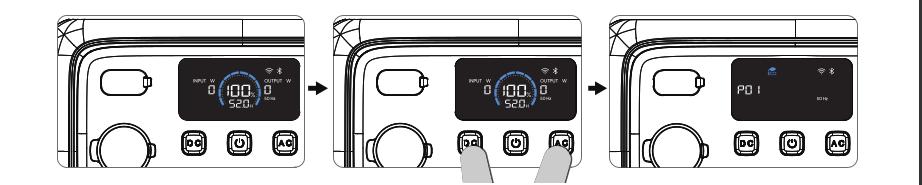
Manuel say to enter “Settings Mode” you have to Press and hold the AC and DC power buttons simultaneously for about 2 seconds.
I’m using my Elite 100v2 as an UPS.
If I press only AC button or DC button the AC or DC will be switched off.
So how can I be sure not to switch off AC or DC if I try to enter “Settings Mode”?
I have to be sure, not to disable AC or DC, because there are running computer connected and I want to prevent a hard power off, because filesystem can be corrupted due to a hard power off.
Hi @wagner,
If I understand your question correctly, you want to access the hidden menu (Setting Mode) on your Elite 100 V2 without turning off the DC-output and/or AC-inverter. You can do this by following the steps below. Just make sure to press the DC and AC buttons simultaneously, and not accidentally one before the other, because that would switch one of them off.
Tip
If you want to be absolutely sure that you don’t accidentally switch off the AC or DC output when entering Settings Mode, you can temporarily shut down your PC before changing the settings.
If you are also using devices on the DC-output, make sure they can be safely shut down or temporarily disconnected as well, so you avoid unexpected interruptions or potential data loss.
Step 1: Press the DC and AC buttons simultaneously for a few seconds. The frequency icon flashes.
Step 2: Press the DC button several times until you reach one of the settinges you want to change.
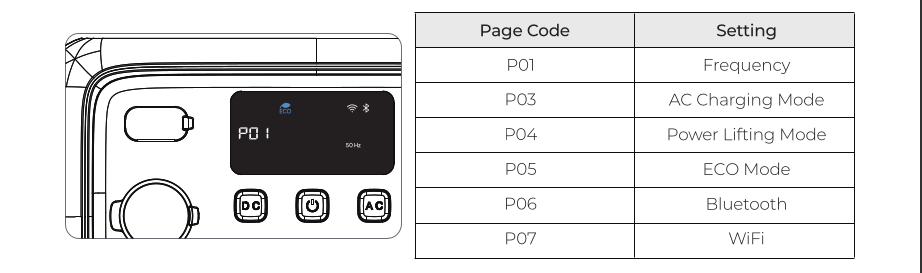
Step 3: Now press the AC button to enable or disable the function of your choosing.
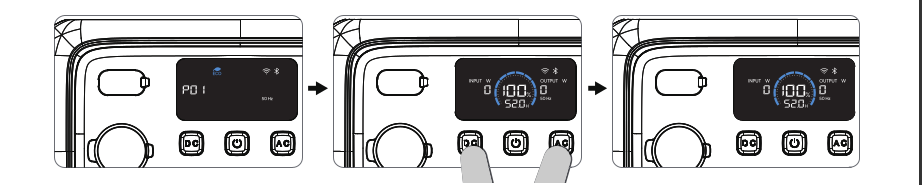
Step 4: Press the DC and AC buttons simultaneously again for a few seconds. The power station will now exit the hidden menu (Setting Mode).
Hopefully, this answers your question.