I recently updated my Elite 100 V2, but now I cannot turn OFF the unit. When I press and hold the Power button the word GRID simply blinks, but the unit never shuts off!
This needs to be fixed, as we have several locations with units like this, but I am telling none of them to update until this is resolved.
IoT v8024.12
ARM v2186.16
DSP v2200.14
BMS v1083.08
Hello, Sorry you’re experiencing this — we’ll help get it resolved. Could you please provide the Elite 100 V2 serial number (SN)? Once we have the SN we’ll investigate the issue and work with our engineering team to provide a fix.
Hi @PVSteve,
If your Bluetti Elite Series is connected to the grid, you’ll need to unplug the power station from the outlet first. The same goes for the solar input. As long as the unit is receiving power, it cannot be turned off. This also applies if the DC and/or AC inverter is still on. I believe this is a safety feature.
Hope this information helps.
Kind regards,
Jason
@BLUETTI
Do you want me to post the serial number here? On a public forum?
Or should I email you discretely? And if so, where should I email you?
Hi @mr.stone,
I’m sorry, but that’s not true. It would properly shut down prior to the recent updates. You would hear the relays flip over when holding the power button, and I never had any loss of power.
The more logical and accurate explanation is Bluetti is trying to justify this as a ‘feature’ instead of fixing it, or worse, forcing the device to be always-on so it can monitor our networks.
Either way, it’s not a good look for Bluetti.
This is either a bug they are trying to avoid fixing, or a legitimate security concern.
Hello, you can send it by PM
Hi @PVSteve,
Since my purchase of the Elite 30 (October 2025), it has always worked this way. So I don’t know any different. It also seems logical to me that it works this way, since you cannot simply turn off an inverter and the BMS under load, but that’s just my opinion.
Regarding the point you make about
I have been monitoring the Elite 30 since my purchase, and the only thing the power station has done so far is request two DNS records when the power station is powered on. These are:
If you are using the feature where you send your data to the cloud to monitor your power station, such as generation and consumption, the power station will communicate more frequently with gw.bluettipower.com. However, so far, the power station has only connected to Bluetti and has not done anything else on the network.
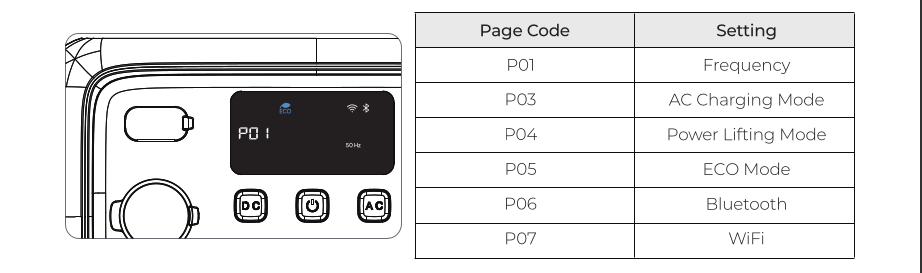
You can disable the Wi-Fi on the Elite series if you wish by following the instructions below.

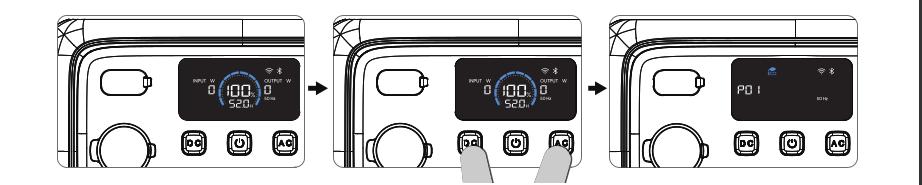
Step 1: Press the DC and AC buttons simultaneously for a few seconds. The frequency icon flashes.
Step 2: Press the DC button several times until you reach P07.
Step 3: Now press the AC button to enable or disable the WiFi function. If Wi-Fi is enabled, the Wi-Fi icon will appear on your power station’s display.
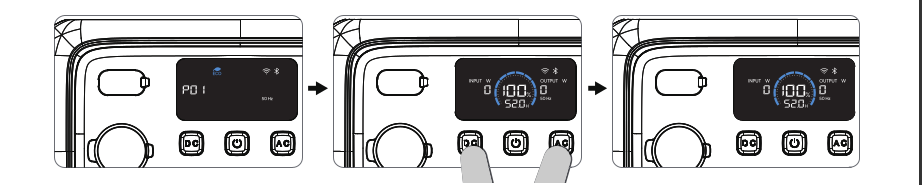
Step 4: Press the DC and AC buttons simultaneously again for a few seconds. The power station will now exit the hidden menu.
Other options include:
Isolating the power station within the network, so it has access to the internet but not to your home network. For this solution, your modem and/or router must support this feature.
Kind regards,
Jason
Here’s a video of it not shutting down anymore: https://youtube.com/shorts/oVIQvwzjSgA
Sorry Jason, it doesn’t make sense you cannot power off an electronic device under any circumstances. Not to mention it DID function properly prior to the latest round of updates.
I would hear both relays click off, and the device sat and waited until I turned it back on. We would go on vacation and I’d have no loss of power or anything strange happen.
This is an absolute regression in their firmware.