Bluetti premium 100 v2 Dead ater 3 weeks

Subject: BMS locked in sleep mode after power outage – request for solution or replacement

Hello Bluetti Support Team,

I would like to ask for your assistance regarding an issue with my Bluetti power station.

I purchased the unit, and after approximately three weeks of normal use, during a power outage the station entered sleep mode and could not be woken up by any method. No button combinations or standard procedures worked.

At one point, I supplied 12 V to the standard input, after which the station powered on and requested a firmware update for several internal components (not the BMS controller). The update completed successfully using the official procedure. However, after some time, another power outage occurred, the station went to sleep again, and this time it has never woken up since.

I created a topic on the Bluetti forum but did not receive any response. Since Bluetti does not provide official service in Ukraine, I was forced to look for third-party service centers, where the repair time was estimated to be at least one month. Therefore, I decided to disassemble the station myself in order to understand the root cause.

After disassembly, I found no visible signs of damage. I accessed the battery compartment and checked all battery cells — they are well balanced, and the battery pack outputs 54 V. There are no short circuits on the power output.

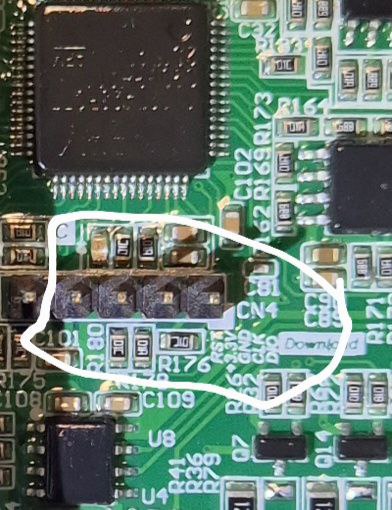
I then supplied power to the 5-pin diagnostic connector on the BMS board. The board powers up and the LEDs blink, indicating that the logic is alive, but no further action occurs and the P output remains locked.

I would like to ask Bluetti:

Is there an official method to recover the BMS from this state?

Is it possible to order a replacement BMS controller board, either as an exchange or for purchase?

What would be the correct procedure to resolve this issue?

Thank you very much for your time and support.


As you can see, the system is charging and discharging, everything is working normally.
I went through the application and checked for updates. There are no updates.

Now let’s move on to how I managed to start the station together with the gpt chat. We worked hard to resolve this issue. In the morning, we agreed that there was no reset on the board, and the GPT chat gave up and advised me not to bother anywhere else.
Based on the previous advice from the gpt chat, I still supplied power from the 5-volt adapter.
We decided that this was the only place where it would be possible to revive the BMS controller board. It is very important that the middle leg of this contact connector is the ground. The first one left from the middle is the power supply itself, and as it turned out, it controls the launch of all systems.
I look forward to your comments and I really look forward to comments from Blue Yeti support

https://youtube.com/shorts/649kzbqtl7A?feature=share


Additional update – reproducible firmware issue (request for BMS/MCU firmware)

I would like to add an important update after further testing.

When the station is powered off using the power button or via the mobile app, it consistently enters a deep sleep / ship mode and cannot be woken up by any standard method (button, app, charger, or standard inputs).

The only way to revive the unit is by supplying 5 V to the internal 5-pin diagnostic connector on the BMS board. After this, the logic wakes up, the system starts normally, and the station works correctly — until it is powered off again, after which the same issue repeats.

This behavior is 100% reproducible and clearly indicates a firmware or power-management logic issue, not a hardware failure:

Battery pack is healthy (54 V, balanced cells)

No short circuits

Power stage and MOSFETs are functional

System operates normally once booted

Based on this, I would like to request:

  1. An official firmware update (BMS and/or MCU) that fixes the deep sleep / wake-up issue

  2. Instructions on how to flash or update the firmware, if possible for end users

  3. If a firmware solution is not available, confirmation whether a BMS controller board replacement can be provided (paid or exchange)

This issue appears to be widespread, as multiple service centers report a large number of Elite and Premium series units with identical symptoms.

Please advise on the correct official solution.

Thank you.

Upd.
Error history shows E074, E016, E011, and E039. These clearly indicate a BMS communication and power-state firmware issue rather than a hardware failure. Battery voltage is stable at 54 V and cells are balanced.

Now we know.
Still wondering if BMS v1083.10 prevents it from dying.

Has your warranty expired? If not, you should’ve probably just sent it back, received money, and cut the losses.
Maybe I’m wrong, but I don’t think they’ll DM their diagnostics software, firmware files, and send parts to a random customer. Not even in the face of Armageddon. But who knows.

1 Like

I just want to remind you that there’s a war going on in my country, and we’re under constant attacks from martyrs, missiles, and bombs flying at energy facilities. Almost every family has a generator or charging station, which allows us to survive. There are no official service centers in Ukraine, and the store that sold me this station doesn’t respond to calls. Therefore, we have to solve technical problems so my family can live in the 21st century and not the Middle Ages.

1 Like

@eehor dude, I’m from Kyiv, I know how it is. And I also own Premium 100.
As for “There are no official service centers in Ukraine”, are you sure about that? What about ITP Service in Kyiv?
Official or not, the shop where you bought it must return your money if they’re unable to repair it.
Not sure why you decided to void your warranty by disassembling it while not having either the software or the hardware to repair it.
Now you’re stuck with it, just like any other customer, and should wait till Bluetti comes up with the fix and the software gets obtained by our (non or semi) official service centers.

1 Like

Hello. @BLUETTI_CARE!
PLEASE NOTE THE MESSAGE IN THIS TOPIC.
You can contact your technical specialists. Perhaps they can quickly check this and, if it’s a firmware issue, update the firmware to avoid more dead stations of this model.
Thanks, waiting for the answer!

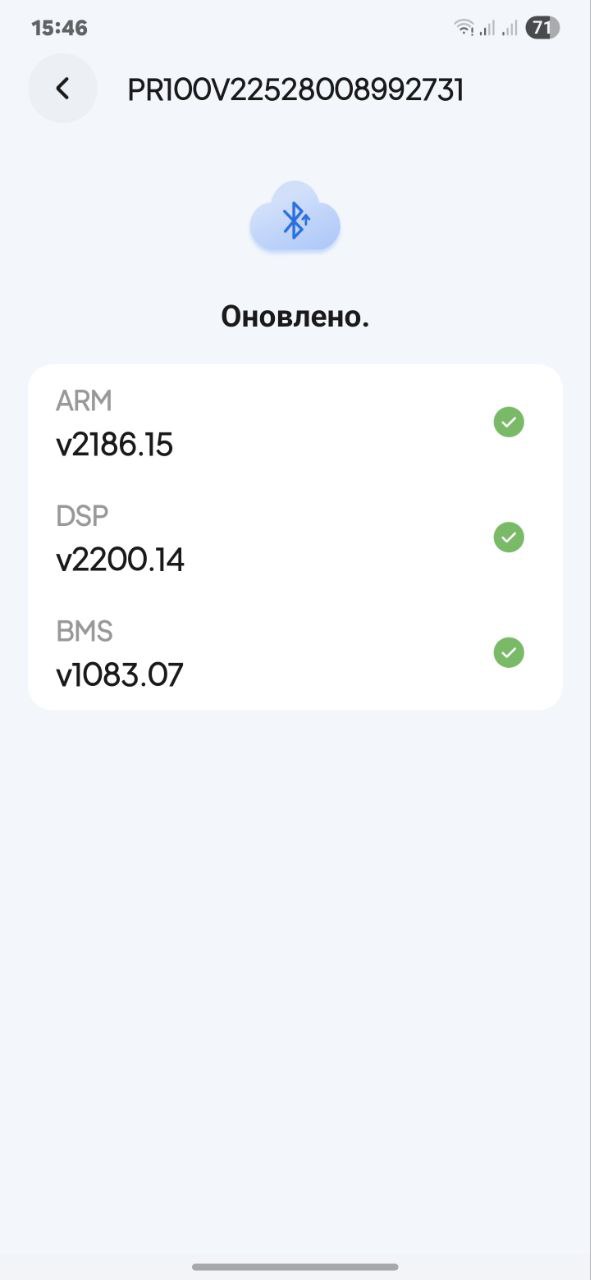
I have model Bluetti Elite 100 v2
ARM v2186.15
DSP v2200.16
BMS v1083.10
So far everything works.
@BLUETTI_CARE Maybe you could try installing the same firmware on this model? If the station comes back online, we’ll have confirmation that these firmware versions are working.
@eehor Do you agree to try?

1 Like

The station work is fine, but I don’t turn it off completely, and it’s on standby when I’m not using it.
and I’m still waiting for a decision from the support team.

They might not notice unless you explicitly specify your login. That’s why I included it.

If there’s no solution, you’ll have to mount a connector on the case to supply 5 volts from it.
Just kidding.
Seriously, the station’s architecture is such that, for energy-saving purposes, the battery and BMS are completely drained. About a few minutes after disconnecting the inverter input, the battery voltage drops to zero.
Logically, there should be some kind of power element on the top plate that should wake the BMS when you press the central button.

Your station is disassembled; inspect it carefully. It should be a small power source—a battery or a supercapacitor. There’s either a defect in the power source, the circuit that powers it, or the firmware.

Logically, the responsible moderators will read this thread tomorrow, Monday. We’ll wait for their response.

1 Like

I was thinking about ext.connector 5 )
At board , don’t remember, maybe display i see element like 2032 battery

Не пиляй корпус поки що :grinning:
Давай почекаємо відповіді. Це вже третя тема про “мертвих” , але ти копнув найглибше.
Сподіваюсь все віришиться без варіанту з додаткою діркої та зовнішним живленням 5в.

1 Like

Добрый день!
Вам не кажется, что 54V это слишком высокое напряжение для батареи?
В характеристиках станции указано, что батарея 51,2V на 20Ah

ARM v2186.15 → v2186

@BLUETTI_CARE
Updated today. I wonder what they changed? Does it protect against dying?

There were three updates today. The good news is that the station can be turned off with the button using the standard method, but it won’t turn on.


Егор, запустить станцию можно было не разбирая ее. Есть два способа:

  1. Через порт XT60 от автомобильного прикуривателя или АКБ на 12V. Так получилось сделать у Сергея в соседней ветке обсуждения. Для этого нужен кабель XT60 → Авто или Крокодилы, которого нет в комплекте.
  2. У другого пользователя (Александр, есть отзыв на сайте Розетка) получилось запустить станцию, подключив повербанк кабелем usb-c - usb-c. Я не знаю, насколько этот способ правильный, но со слов Александра станция оживала после такого подключения.

Обратите внимание, что у Сергея станция ожила через 15 часов, а у Александра способ работал не всегда и какое-то количество раз, а потом он ее отправил в сервис.
Я продолжаю думать, что причиной отключения АКБ является перезаряд батареи, после которого срабатывает защита. Пока защита активна, батарея не подключается даже при наличии внешнего источника питания на управляющую электронику. Но через какое-то время заряд батареи снижается (15 часов у Сергея), защита отключается и управляющая электроника снова может подключить батарею.

Если у вас есть возможность включить зарядную станцию, сделайте полный цикл для калибровки. Разрядите станцию в 0 до отключения инвертора (управляющая электроника будет работать) Затем зарядите ее до 100% не подключая никакие другие устройства в процессе зарядки.

p.s. Если у вас станция остается разобранной, могли бы вы замерять показания напряжения батареи после процесса калибровки?

Вы невнимательно читали предыдущие посты, все способы указанные выше, после предыдущего обновления уже не работают.
Напряжение на батарее 54,3 в после одного цикла заряд-разряд

1 Like

Егор, т.е. после последнего обновления не работает даже способ прямого подключения к плате BMS?