Bluetti premium 100 v2 Dead ater 3 weeks

Subject: BMS locked in sleep mode after power outage – request for solution or replacement

Hello Bluetti Support Team,

I would like to ask for your assistance regarding an issue with my Bluetti power station.

I purchased the unit, and after approximately three weeks of normal use, during a power outage the station entered sleep mode and could not be woken up by any method. No button combinations or standard procedures worked.

At one point, I supplied 12 V to the standard input, after which the station powered on and requested a firmware update for several internal components (not the BMS controller). The update completed successfully using the official procedure. However, after some time, another power outage occurred, the station went to sleep again, and this time it has never woken up since.

I created a topic on the Bluetti forum but did not receive any response. Since Bluetti does not provide official service in Ukraine, I was forced to look for third-party service centers, where the repair time was estimated to be at least one month. Therefore, I decided to disassemble the station myself in order to understand the root cause.

After disassembly, I found no visible signs of damage. I accessed the battery compartment and checked all battery cells — they are well balanced, and the battery pack outputs 54 V. There are no short circuits on the power output.

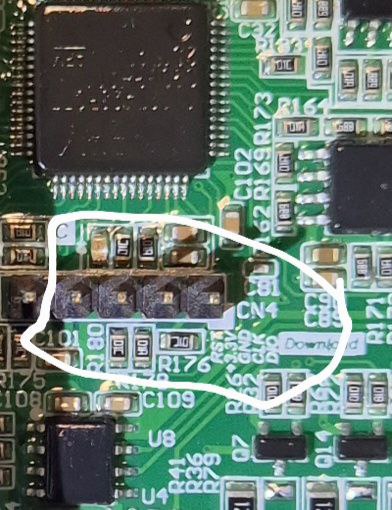
I then supplied power to the 5-pin diagnostic connector on the BMS board. The board powers up and the LEDs blink, indicating that the logic is alive, but no further action occurs and the P output remains locked.

I would like to ask Bluetti:

Is there an official method to recover the BMS from this state?

Is it possible to order a replacement BMS controller board, either as an exchange or for purchase?

What would be the correct procedure to resolve this issue?

Thank you very much for your time and support.


As you can see, the system is charging and discharging, everything is working normally.
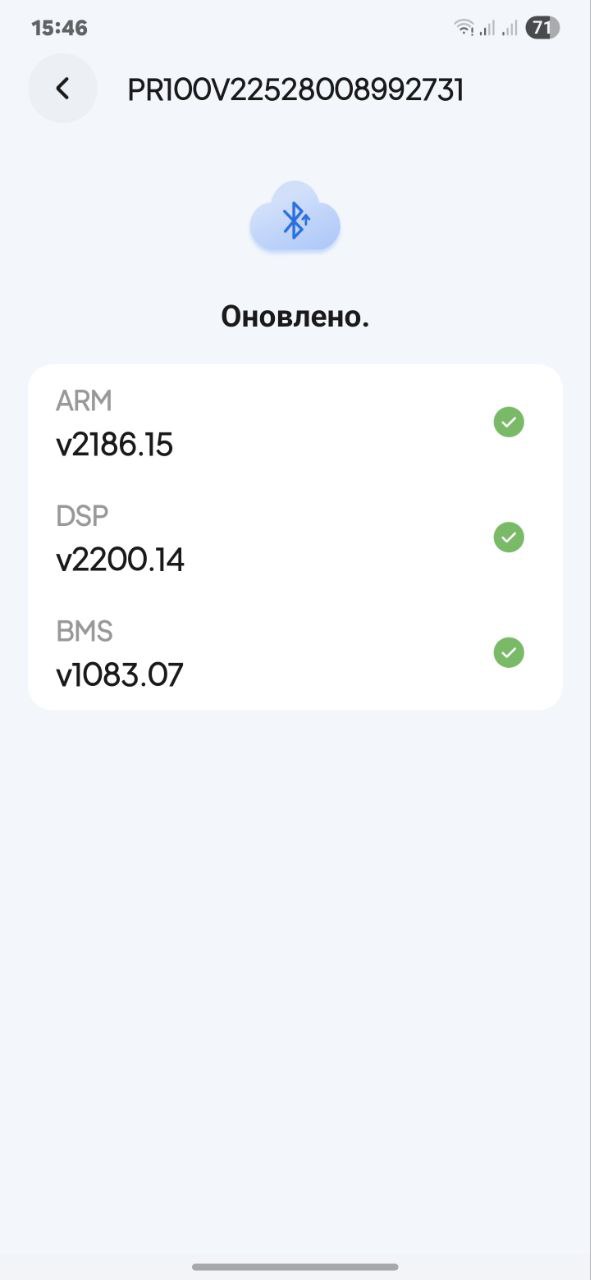
I went through the application and checked for updates. There are no updates.

Now let’s move on to how I managed to start the station together with the gpt chat. We worked hard to resolve this issue. In the morning, we agreed that there was no reset on the board, and the GPT chat gave up and advised me not to bother anywhere else.
Based on the previous advice from the gpt chat, I still supplied power from the 5-volt adapter.
We decided that this was the only place where it would be possible to revive the BMS controller board. It is very important that the middle leg of this contact connector is the ground. The first one left from the middle is the power supply itself, and as it turned out, it controls the launch of all systems.
I look forward to your comments and I really look forward to comments from Blue Yeti support

https://youtube.com/shorts/649kzbqtl7A?feature=share


Additional update – reproducible firmware issue (request for BMS/MCU firmware)

I would like to add an important update after further testing.

When the station is powered off using the power button or via the mobile app, it consistently enters a deep sleep / ship mode and cannot be woken up by any standard method (button, app, charger, or standard inputs).

The only way to revive the unit is by supplying 5 V to the internal 5-pin diagnostic connector on the BMS board. After this, the logic wakes up, the system starts normally, and the station works correctly — until it is powered off again, after which the same issue repeats.

This behavior is 100% reproducible and clearly indicates a firmware or power-management logic issue, not a hardware failure:

Battery pack is healthy (54 V, balanced cells)

No short circuits

Power stage and MOSFETs are functional

System operates normally once booted

Based on this, I would like to request:

  1. An official firmware update (BMS and/or MCU) that fixes the deep sleep / wake-up issue

  2. Instructions on how to flash or update the firmware, if possible for end users

  3. If a firmware solution is not available, confirmation whether a BMS controller board replacement can be provided (paid or exchange)

This issue appears to be widespread, as multiple service centers report a large number of Elite and Premium series units with identical symptoms.

Please advise on the correct official solution.

Thank you.

Upd.
Error history shows E074, E016, E011, and E039. These clearly indicate a BMS communication and power-state firmware issue rather than a hardware failure. Battery voltage is stable at 54 V and cells are balanced.